

Goals
Configure performance thresholds to establish quality expectations across your organization and customize them for specific workspaces.
Goals work as a hierarchy. You set organization-wide defaults that apply everywhere, then optionally override specific thresholds at the workspace level for teams with different requirements.
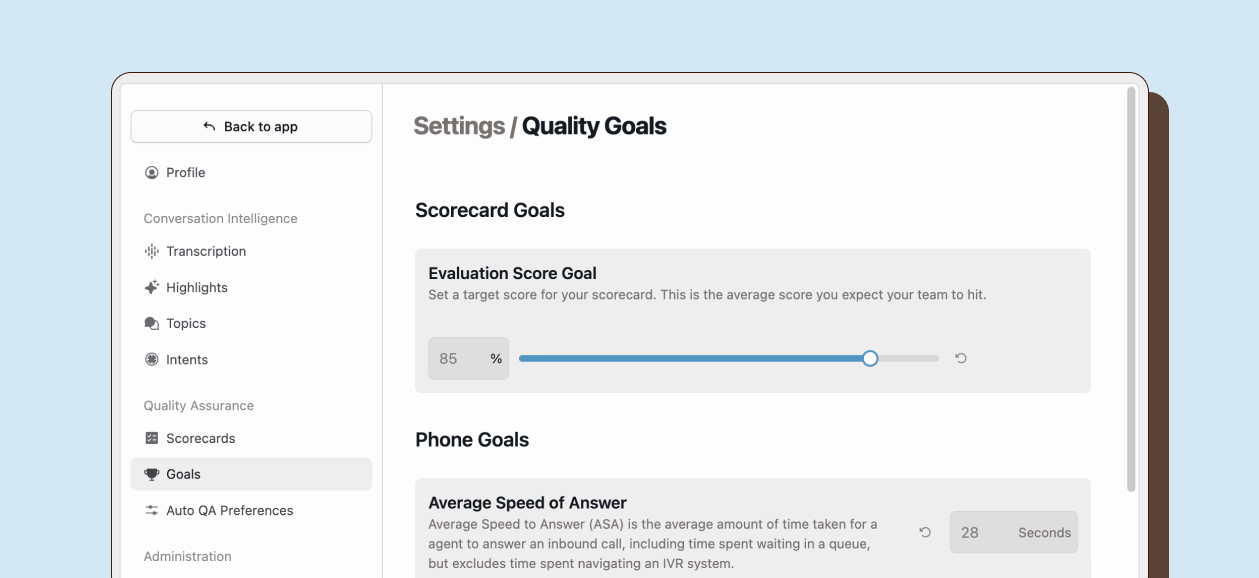
Types of goals
Section titled “Types of goals”Happitu supports three categories of goals based on what you are measuring.
Scorecard goals
Section titled “Scorecard goals”Scorecard goals set targets for quality evaluation performance. The evaluation score goal defines the average score you expect your team to achieve across evaluations. This is expressed as a percentage and typically reflects your minimum acceptable quality standard.
Phone goals
Section titled “Phone goals”Phone goals cover voice interaction metrics. Speed of answer measures how quickly agents pick up inbound calls, excluding time customers spend navigating IVR systems. Handle time includes the full duration of the interaction including talk time, hold time, and after-call work. Abandon rate tracks the percentage of callers who hang up before reaching an agent. Dead air tracks periods of silence where neither party is speaking.
Chat goals
Section titled “Chat goals”Chat goals focus on digital conversation performance. First response time measures how quickly agents provide their initial reply to customer messages. This uses preset benchmarks rather than custom values, with options ranging from immediate response to one minute.
Setting organization defaults
Section titled “Setting organization defaults”Organization defaults establish baseline expectations across your entire account. Navigate to Settings > Goals to modify the default goals.
Overriding goals at the workspace level
Section titled “Overriding goals at the workspace level”Workspaces can customize goals to reflect their specific operational requirements. This is useful when different teams have different standards based on their function, experience level, or customer expectations.
To override workspace goals, navigate to Settings > Workspaces, select a workspace, and scroll to the Goals section. Here you can set custom values for any goal category. Fields you leave blank or clear will fall back to the organization default.
When a workspace sets its own goal value, that target applies only to interactions within that workspace. This allows your technical support team to have different handle time expectations than your sales team, for example.